After more than 13 years, and tens of thousands of questions, Moz Q&A closed on 12th December 2024. Whilst we’re not completely removing the content - many posts will still be possible to view - we have locked both new posts and new replies. More details here.
Improve Google Business ranking
-
While my client's websites have been ranking well in SERP for their keyterms I'm at a lost on what I can do to improve their Google business/map presence. I'm referring to their listing where the top three come up or when you search on Google Maps.
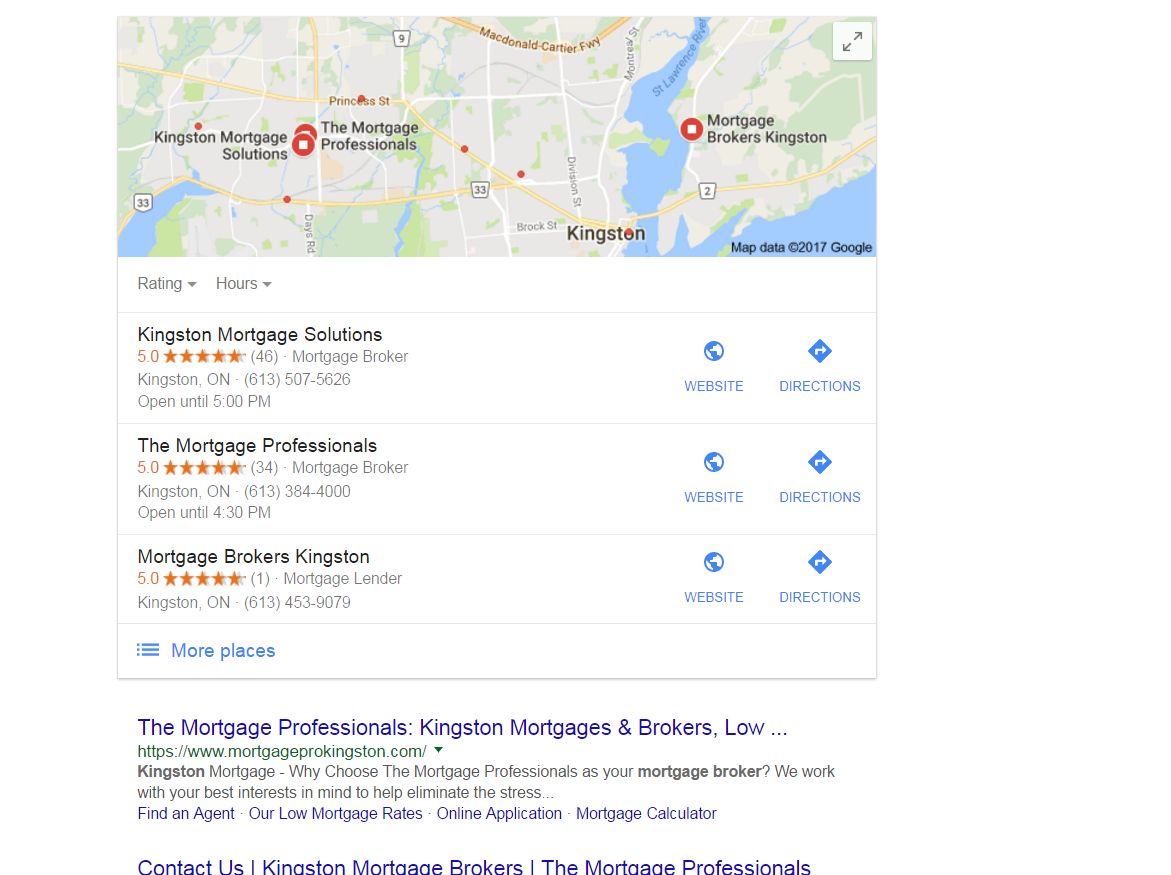
https://gyazo.com/26ec78ed7f712157ec72492199545431Ex 1. Several months ago my client was ranked #1 both for SERP and maps until they dropped to 2nd on maps. Now they're ranked 1st in search yet 2nd for local business rankings as you can see from the screenshot above. At one point my client's business did have more reviews than the 1st ranking business yet they still weren't 1st.
Ex. 2. Client(s) is ranked 4th in search and doesn't show in the top 3 map listings for their search term. If you click on More places to view Google Maps they're listed all the way down as the 15th listing or worse can't even be found when searching by their main SEO key term . Of course they are found by searching for their business name so it's not like there is a problem with the listing.
I make sure to:
-
Completely fill out their Google Business profile(NAP, hours and add pictures)
-
Have my client try to gain positive reviews
-
Manage and respond to reviews(mainly the negative ones)
-
Add map and Google business link to their website
Can anyone offer any other insight on what else can be done to improve their local presence on maps that I might be missing?
-
-
Those pesky duplicate, Joy!
FPK - has our community helped you? Do you have any further questions?
-
Hey There.
I actually see something different than you but I'm searching from the Toronto area which is 3-4 hours from Kingston. I actually see this which shows the duplicate Miriam mentioned as ranking 4th and the listing you showed is actually filtered because it's using the exact same phone # and address.
Having this duplicate is doing you a huge injustice because it's not linking to the website that is ranking high organically like you mentioned and it's splitting their reviews which just results in 2 profiles not ranking as well as they would if all the reviews were on 1 listing. Plus, since it's a violation of Google's guidelines, one of them could get removed and then you would lose the reviews on it.
I'd suggest consolidating them. This duplicate is verified so if you don't know who created it, you'll need to get access to the listing first. The naming convention it's using on the listing is also a violation of the guidelines.
The listing that ranks 2nd is doing some serious keyword stuffing so I would suggest you level the playing field by editing the listing and removing the keywords.
The listing that ranks 3rd and is above you should also look into as the name is keyword-stuffed, she already has another listing with her name, and the address she used on this listing actually belongs to a Re/Max agent as seen here and in Street View.
As for your 2nd question, it's hard to offer suggestions without knowing specifics

-
Hi FPK,
Glad to have you here. So, your client is #2 in the screenshot (I believe I'm understanding that correctly, but please let me know if I've misunderstood). If I'm correct, here are a few things to remember:
-
Local rankings are not static. What you see is not what your client or his customers will necessarily see, depending on your and their locations at the time of making the search. For more on this, read Phil Rozek's recent article: http://www.localvisibilitysystem.com/2017/05/24/did-your-local-rankings-really-sink-or-are-you-just-looking-at-them-wrong/
-
Reviews are just one factor of several hundred. To do a complete audit for any client, we recommend assessing all of the top Local Search Ranking Factors mentioned here: https://moz.com/local-search-ranking-factors. You need to audit both your client and any competitor who is outranking him to discover what the higher ranking businesses are getting right that your client may not be excelling at. The breadth of factors is wide: age of domain, age of listing, links, domain authority, topical authority, citation accuracy, authority and scope ... there is so much to consider here, so it's important to avoid oversimplifying this to something like "X is outranking Y because X has more reviews."
-
Definitely dive deep into the effects of Google's Possum filter, which has caused many businesses that share a category and building or street with competitors to experience extreme ranking changes. It looks like Kingston Mortgage Solutions is right across the street from you. To see if Possum may be at work in what your client is experiencing, read Joy Hawkins' article: http://searchengineland.com/everything-need-know-googles-possum-algorithm-update-258900
-
It looks like the client is well within Google's borders for the city of Kingston, so no worries on that score.
-
I'm concerned that I'm seeing duplicate GMB listings for your client. They appear to have listed themselves twice with the identical address and phone number but with two different names: The Mortgage Professionals and Mortgage Pro Team (The Mortgage Professionals). This would be a violation of Google's guidelines (see: <cite class="_Rm">https://support.google.com/business/answer/3038177?hl=en</cite>) and needs to be investigated swiftly. I am also seeing at least 3 practitioner listings at this same address that need to be investigated to ensure that they are guideline-compliant and not being viewed by Google as duplicates. None of the names on these listings meet Google's guidelines, unfortunately. So, we've hit on a real problem here and one that your agency will want to research fully and make every effort to resolve for the client.
-
Moz Local now supports Canada, and a good thing to do would be to look up the client in our free Check Listing tool to begin to assess how widespread this issue is with duplicates. With the full, paid version of the tool, you'll be able to add alternate info, as well, to find as many duplicates as possible.
This is a start, but isn't a genuine substitute for a professional audit, which it looks like this client definitely needs. I hope this quick glance of mine provides a good starting point!
-



Got a burning SEO question?
Subscribe to Moz Pro to gain full access to Q&A, answer questions, and ask your own.
Explore more categories
-
Chat with the community about the Moz tools.
-
Discuss the SEO process with fellow marketers
-
Discuss industry events, jobs, and news!
-
Chat about tactics outside of SEO
-
Dive into research and trends in the search industry.
-
Support
Connect on product support and feature requests.
-

