Moz Q&A is closed.
After more than 13 years, and tens of thousands of questions, Moz Q&A closed on 12th December 2024. Whilst we’re not completely removing the content - many posts will still be possible to view - we have locked both new posts and new replies. More details here.
Screaming From occurences and canonicals what does it all mean
-
Bonjourno from Wetherby UK...
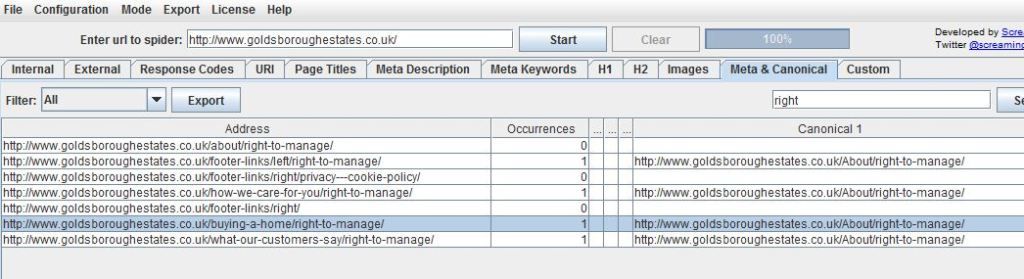
Ive used a package called screamong frog to diagnose canonical errors but can anyone tell me what this means? http://i216.photobucket.com/albums/cc53/zymurgy_bucket/understand-occurances-canonical.jpg
Thanks in advance.
David
-
Thank you for all your replies this was bugging me but the pain of not knowing has vanished like the morning mist as the warming glow of sunshine illumunates truth

-
David
Looks like you may have an issue there. The "address" and "canonical 1" should match about 99% of the time. Right now you're telling Google to index all those different address pages as a single URL (About/right-to-manage)... something to look at - and the suggestions below are both good as well.
-Dan
-
I agree with what Streamline Metrics said, I just want to add to this by linking you to a great SEOmoz post on canonicalization which may help you clear things up more.
In your case, having 1 rel="canonical" tag per page is what you want, so you should be fine with that, just make sure that the canonical tags (listed under canonical 1 in Screaming Frog) is the actual URL that you want.
Hope this helps
Zach -
It simply means how many canonical tags are found on that specific page. So if you had two rel=canonical tags on a page, it would say 2 occurrences. For more info, check out http://www.screamingfrog.co.uk/seo-spider/user-guide/tabs/
Got a burning SEO question?
Subscribe to Moz Pro to gain full access to Q&A, answer questions, and ask your own.
Browse Questions
Explore more categories
-
Moz Tools
Chat with the community about the Moz tools.
-
SEO Tactics
Discuss the SEO process with fellow marketers
-
Community
Discuss industry events, jobs, and news!
-
Digital Marketing
Chat about tactics outside of SEO
-
Research & Trends
Dive into research and trends in the search industry.
-
Support
Connect on product support and feature requests.
Related Questions
-
Unsolved Question about a Screaming Frog crawling issue
Hello, I have a very peculiar question about an issue I'm having when working on a website. It's a WordPress site and I'm using a generic plug in for title and meta updates. When I go to crawl the site through screaming frog, however, there seems to be a hard coded title tag that I can't find anywhere and the plug in updates don't get crawled. If anyone has any suggestions, thatd be great. Thanks!
Technical SEO | | KyleSennikoff0 -
Can I set a canonical tag to an anchor link?
I have a client who is moving to a one page website design. So, content from the inner pages is being condensed in to sections on the 'home' page. There will be a navigation that anchor links to each relevant section. I am wondering if I should leave the old pages and use rel=canonical to point them to their relevant sections on the new 'home' page rather than 301 them. Thoughts?
Technical SEO | | Vizergy0 -
Can you use Screaming Frog to find all instances of relative or absolute linking?
My client wants to pull every instance of an absolute URL on their site so that they can update them for an upcoming migration to HTTPS (the majority of the site uses relative linking). Is there a way to use the extraction tool in Screaming Frog to crawl one page at a time and extract every occurrence of _href="http://" _? I have gone back and forth between using an x-path extractor as well as a regex and have had no luck with either. Ex. X-path: //*[starts-with(@href, “http://”)][1] Ex. Regex: href=\”//
Technical SEO | | Merkle-Impaqt0 -
Canonical tag for Home page: with or without / at the end???
Setting up canonical tags for an old site. I really need advice on that darn backslash / at the end of the homepage URL. We have incoming links to the homepage as http://www.mysite.com (without the backslash), and as http://www.mysite.com/ (with the backslash), and as http://www.mysite.com/index.html I know that there should be 301 redirects to just one version, but I need to know more about the canonical tags... Which should the canonical tag be??? (without the backslash) or (with the backslash) Thanks for your help! 🙂
Technical SEO | | GregB1230 -
Internal search : rel=canonical vs noindex vs robots.txt
Hi everyone, I have a website with a lot of internal search results pages indexed. I'm not asking if they should be indexed or not, I know they should not according to Google's guidelines. And they make a bunch of duplicated pages so I want to solve this problem. The thing is, if I noindex them, the site is gonna lose a non-negligible chunk of traffic : nearly 13% according to google analytics !!! I thought of blocking them in robots.txt. This solution would not keep them out of the index. But the pages appearing in GG SERPS would then look empty (no title, no description), thus their CTR would plummet and I would lose a bit of traffic too... The last idea I had was to use a rel=canonical tag pointing to the original search page (that is empty, without results), but it would probably have the same effect as noindexing them, wouldn't it ? (never tried so I'm not sure of this) Of course I did some research on the subject, but each of my finding recommanded one of the 3 methods only ! One even recommanded noindex+robots.txt block which is stupid because the noindex would then be useless... Is there somebody who can tell me which option is the best to keep this traffic ? Thanks a million
Technical SEO | | JohannCR0 -
Trailing Slashes In Url use Canonical Url or 301 Redirect?
I was thinking of using 301 redirects for trailing slahes to no trailing slashes for my urls. EG: www.url.com/page1/ 301 redirect to www.url.com/page1 Already got a redirect for non-www to www already. Just wondering in my case would it be best to continue using htacces for the trailing slash redirect or just go with Canonical URLs?
Technical SEO | | upick-1623910 -
Duplicate canonical URLs in WordPress
Hi everyone, I'm driving myself insane trying to figure this one out and am hoping someone has more technical chops than I do. Here's the situation... I'm getting duplicate canonical tags on my pages and posts, one is inside of the WordPress SEO (plugin) commented section, and the other is elsewhere in the header. I am running the latest version of WordPress 3.1.3 and the Genesis framework. After doing some testing and adding the following filters to my functions.php: <code>remove_action('wp_head', 'genesis_canonical'); remove_action('wp_head', 'rel_canonical');</code> ... what I get is this: With the plugin active + NO "remove action" - duplicate canonical tags
Technical SEO | | robertdempsey
With the plugin disabled + NO "remove action" - a single canonical tag
With the plugin disabled + A "remove action" - no canonical tag I have tried using only one of these remove_actions at a time, and then combining them both. Regardless, as long as I have the plugin active I get duplicate canonical tags. Is this a bug in the plugin, perhaps somehow enabling the canonical functionality of WordPress? Thanks for your help everyone. Robert Dempsey0 -
Should there be a canonical tag on my 404 error page?
In my crawl diagnostics, I notice some 4xx client errors. They are appearing for pages that no longer exist, so I'm not sure what the problem is. Shouldn't they just be dealt as 404's? Anyway, on closer inspection I noticed that my 404 error page contains a canonical tag which points to the missing page. Could this be the issue? Is it a good idea to remove the canonical tag from this error page? Thanks.
Technical SEO | | Leighm0