Moz Q&A is closed.
After more than 13 years, and tens of thousands of questions, Moz Q&A closed on 12th December 2024. Whilst we’re not completely removing the content - many posts will still be possible to view - we have locked both new posts and new replies. More details here.
Sudden Drop in Mobile Core Web Vitals
-
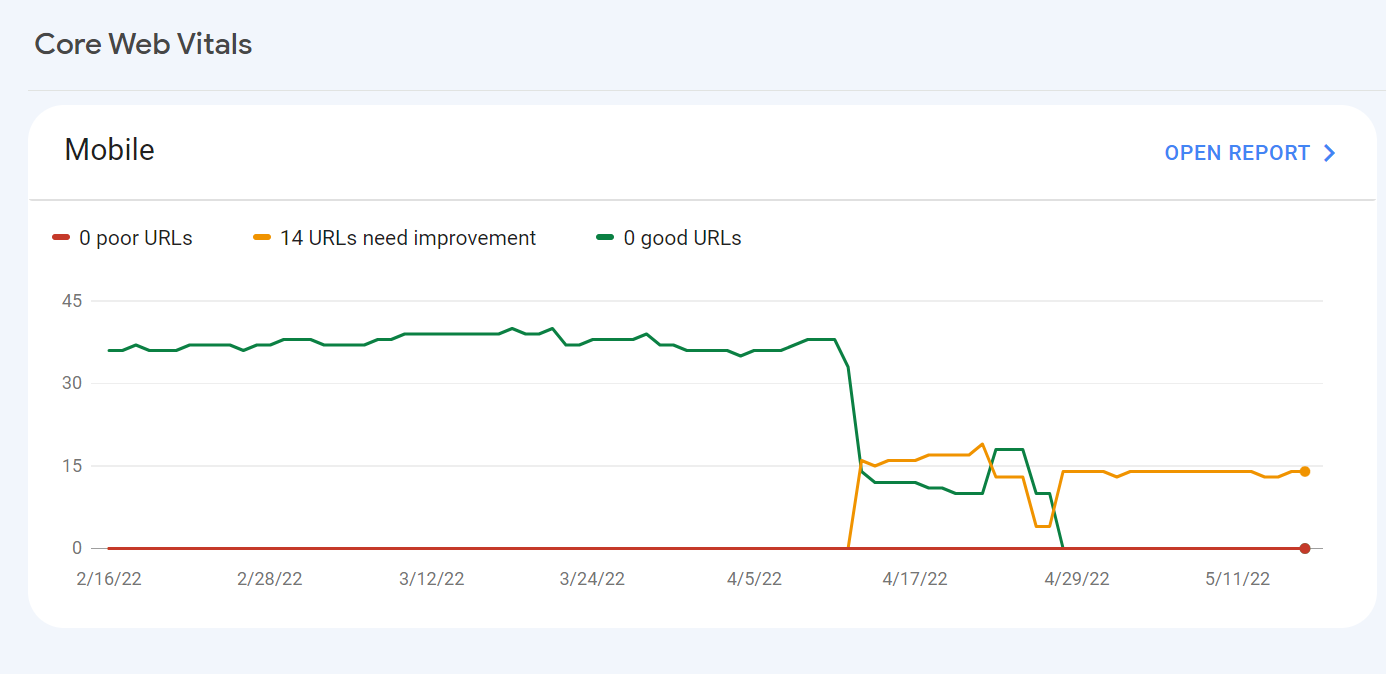
For some reason, after all URLs being previously classified as Good, our Mobile Web Vitals report suddenly shifted to the above, and it doesn't correspond with any site changes on our end.
Has anyone else experience something similar or have any idea what might have caused such a shift?
Curiously I'm not seeing a drop in session duration, conversion rate etc. for mobile traffic despite the seemingly sudden change.
-
I can’t understand their algorithm for core web vitals. I have made some technical updates to our website for speed optimization, but the thing that happened in the search console is very confusing for my site.
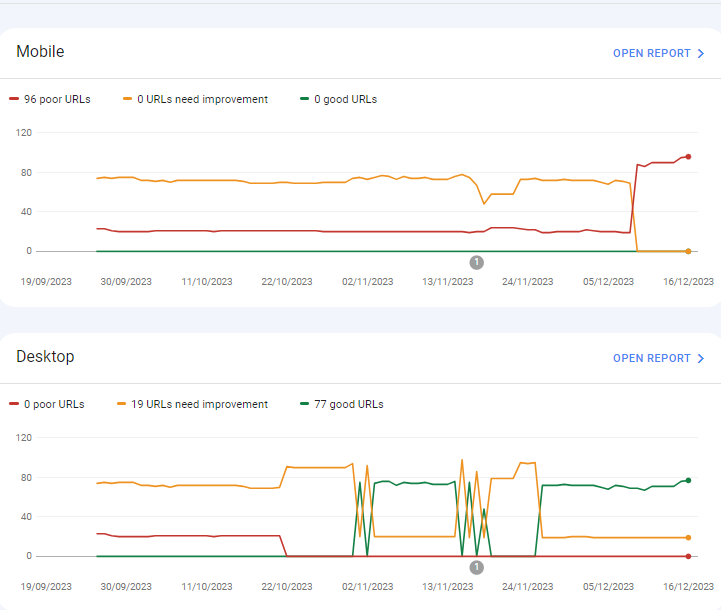
For desktops, pages are indexed as good URLs
while mobile-indexed URLs are displayed as poor URLs.
Our website is the collective material for people looking for Canada immigration (PAIC), and 70% of the portion is filled with text only. We are using webp images for optimization, still it is not passing Core Web Vitals.I am looking forward to the expert’s suggestion to overcome this problem.
-
I can’t understand their algorithm for core web vitals. I have made some technical updates to our website for speed optimization, but the thing that happened in the search console is very confusing for my site.
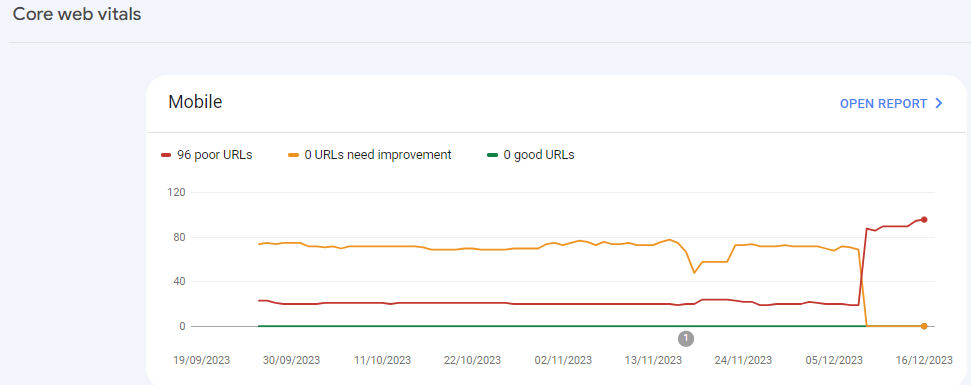
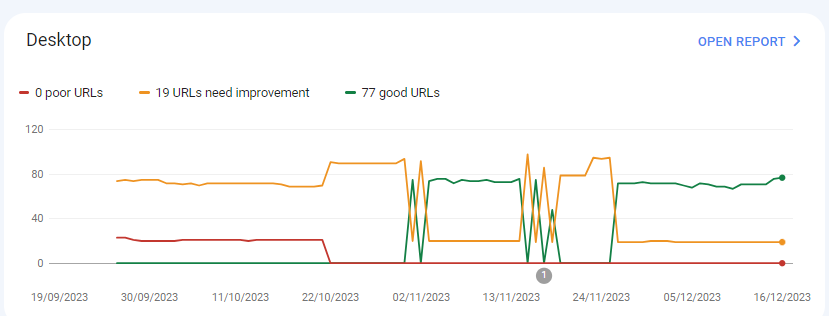
For desktops, pages are indexed as good URLs
while mobile-indexed URLs are displayed as poor URLs.
Our website is the collective material for people looking for Canadian immigration (PAIC), and 70% of the portion is filled with text only. We are using webp images for optimization, still it is not passing Core Web Vitals.I am looking forward to the expert’s suggestion to overcome this problem.
-
@rwat Hi, did you find a solution?
-
Yes, I am also experiencing the same for one of my websites, but most of them are blog posts and I am using a lot of images without proper optimization, so that could be the reason. but not sure.
It is also quite possible that Google maybe adding some more parameters to their main web critical score.
Got a burning SEO question?
Subscribe to Moz Pro to gain full access to Q&A, answer questions, and ask your own.
Browse Questions
Explore more categories
-
Moz Tools
Chat with the community about the Moz tools.
-
SEO Tactics
Discuss the SEO process with fellow marketers
-
Community
Discuss industry events, jobs, and news!
-
Digital Marketing
Chat about tactics outside of SEO
-
Research & Trends
Dive into research and trends in the search industry.
-
Support
Connect on product support and feature requests.
Related Questions
-
Unsolved Why My site pages getting video index viewport issue?
Hello, I have been publishing a good number of blogs on my site Flooring Flow. Though, there's been an error of the video viewport on some of my articles. I have tried fixing it but the error is still showing in Google Search Console. Can anyone help me fix it out?
Technical SEO | | mitty270 -
Unsolved Google URL inspection live test rendering issue.
Hi Everyone, This is my first post on Moz. I have been trying to get this thing sorted and have read everywhere and everyone just says don't worry about it. I would really like some advice/suggestions on this it will be really helpful. When I use the Google URL inspection tool from the Google search console the page rendering is completely broken. The tool refuses to load resources each time. At end of the day that's how the website is rendered in Google cache. I have already tried disabling cache plugins and Cloudflare but nothing works. site - nationalcarparts.co.nz
Support | | caitlinrolex789
This is how it renders when using URL inspection tool -
https://prnt.sc/7XKHtEU01gEl and if you check cache:https://nationalcarparts.co.nz this is how Google is caching it. Plugins I am using - Elementor Version 3.6.1, Elementor Pro Version 3.6.4, Exclusive Addons Elementor Version 2.5.4, Exclusive Addons Elementor Pro Version 1.4.6, WP- rocket, Cloudflare Pro plan with the plugin. Please if someone has fixed this issue and has a possible solution for it. Thanks cacheissue1.PNG1 -
Unsolved Duplicate LocalBusiness Schema Markup
Hello! I've been having a hard time finding an answer to this specific question so I figured I'd drop it here. I always add custom LocalBusiness markup to clients' homepages, but sometimes the client's website provider will include their own automated LocalBusiness markup. The codes I create often include more information. Assuming the website provider is unwilling to remove their markup, is it a bad idea to include my code as well? It seems like it could potentially be read as spammy by Google. Do the pros of having more detailed markup outweigh that potential negative impact?
Local Website Optimization | | GoogleAlgoServant0 -
Solved How to solve orphan pages on a job board
Working on a website that has a job board, and over 4000 active job ads. All of these ads are listed on a single "job board" page, and don’t obviously all load at the same time. They are not linked to from anywhere else, so all tools are listing all of these job ad pages as orphans. How much of a red flag are these orphan pages? Do sites like Indeed have this same issue? Their job ads are completely dynamic, how are these pages then indexed? We use Google’s Search API to handle any expired jobs, so they are not the issue. It’s the active, but orphaned pages we are looking to solve. The site is hosted on WordPress. What is the best way to solve this issue? Just create a job category page and link to each individual job ad from there? Any simpler and perhaps more obvious solutions? What does the website structure need to be like for the problem to be solved? Would appreciate any advice you can share!
Reporting & Analytics | | Michael_M2 -
Sudden Indexation of "Index of /wp-content/uploads/"
Hi all, I have suddenly noticed a massive jump in indexed pages. After performing a "site:" search, it was revealed that the sudden jump was due to the indexation of many pages beginning with the serp title "Index of /wp-content/uploads/" for many uploaded pieces of content & plugins. This has appeared approximately one month after switching to https. I have also noticed a decline in Bing rankings. Does anyone know what is causing/how to fix this? To be clear, these pages are **not **normal /wp-content/uploads/ but rather "index of" pages, being included in Google. Thank you.
Technical SEO | | Tom3_150 -
Crawl rate dropped to zero
Hello, I recently moved my site in godaddy from cpanel to managed wordpress. I bought this transfer directly from GoDaddy customer service. in this process they accidentally changed my domain from www to non www. I changed it back after the migration, but as a result of this sites craw rate from search console fell to zero and has not risen at all since then. In addition to this website does not display any other errors, i can ask google manually fetch my pages and it works as before, only the crawl rates seems to be dropped permanently. GoDaddy customer service also claims that do not see any errors but I think, however, that in some way they caused this during the migration when the url changed since the timing match perfectly. also when they accidentally removed the www, crawl rate of my sites non www version got up but fell back to zero when I changed it back to www version. Now the crawl rate of both www and non www version is zero. How do I get it to rise again? Customer service also said that the problem may be related to ftp-data of search console? But they were not able to help any more than .Would someone from here be able to help me with this in anyway please?
Technical SEO | | pok3rplay3r0 -
Sudden jump in the number of 302 redirects on my Squarespace Site
My Squarespace site www.thephysiocompany.com has seen a sudden jump in 302 redirects in the past 30 days. Gone from 0-302 (ironically). They are not detectable using generic link redirect testing sites and Squarespace have not explanation. Any help would be appreciated.
Technical SEO | | Jcoley0 -
Is there a great tool for URL mapping old to new web site?
We are implementing new design and removing some pages and adding new content. Task is to correctly map and redirect old pages that no longer exist.
Technical SEO | | KnutDSvendsen0