Moz Q&A is closed.
After more than 13 years, and tens of thousands of questions, Moz Q&A closed on 12th December 2024. Whilst we’re not completely removing the content - many posts will still be possible to view - we have locked both new posts and new replies. More details here.
Schema Markup Warning "Missing field "url" (optional)"
-
Hello Moz Team, I hope everyone is doing well & good,
I need bit help regarding Schema Markup, I am facing issue in my schema markup specifically with my blog posts,
In my majority of the posts I find error "Missing field "url" (optional)"
As this schema is generated by Yoast plugin, I haven't applied any custom steps.Recently I published a post
https://dailycontributors.com/kisscartoon-alternatives-and-complete-review/
and I tested it at two platforms of schema test
1, Validator.Schema.org
2. Search.google.com/test/rich-resultsSo the validator generate results as follows and shows no error
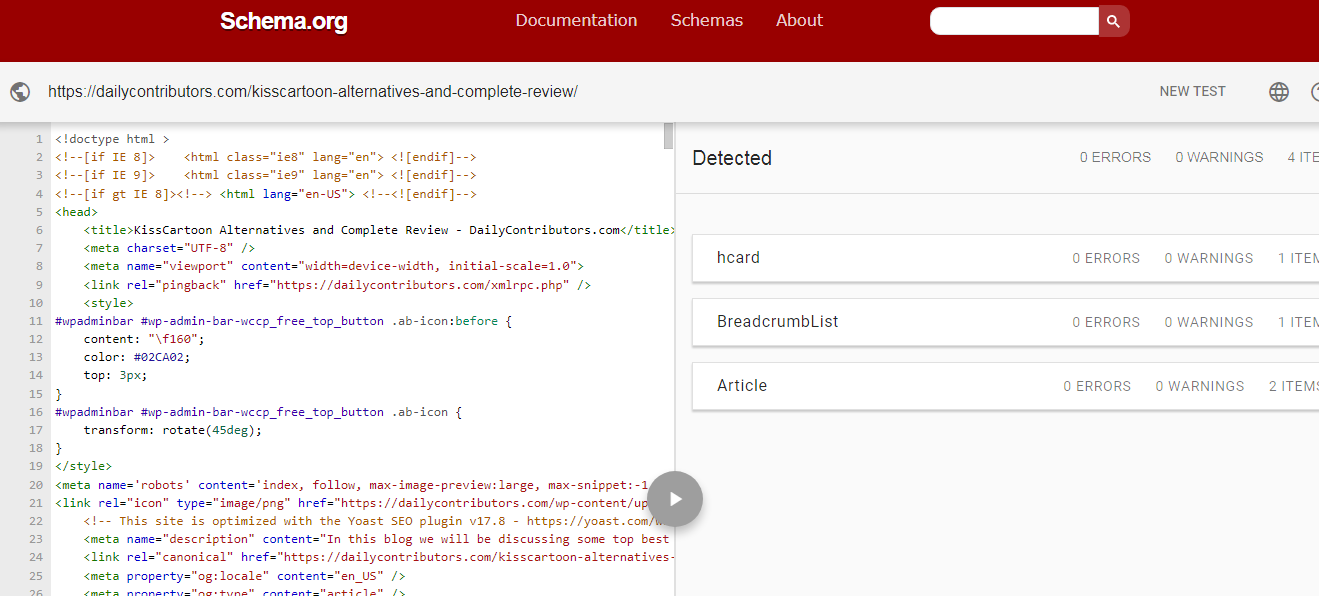
It shows no error
But where as
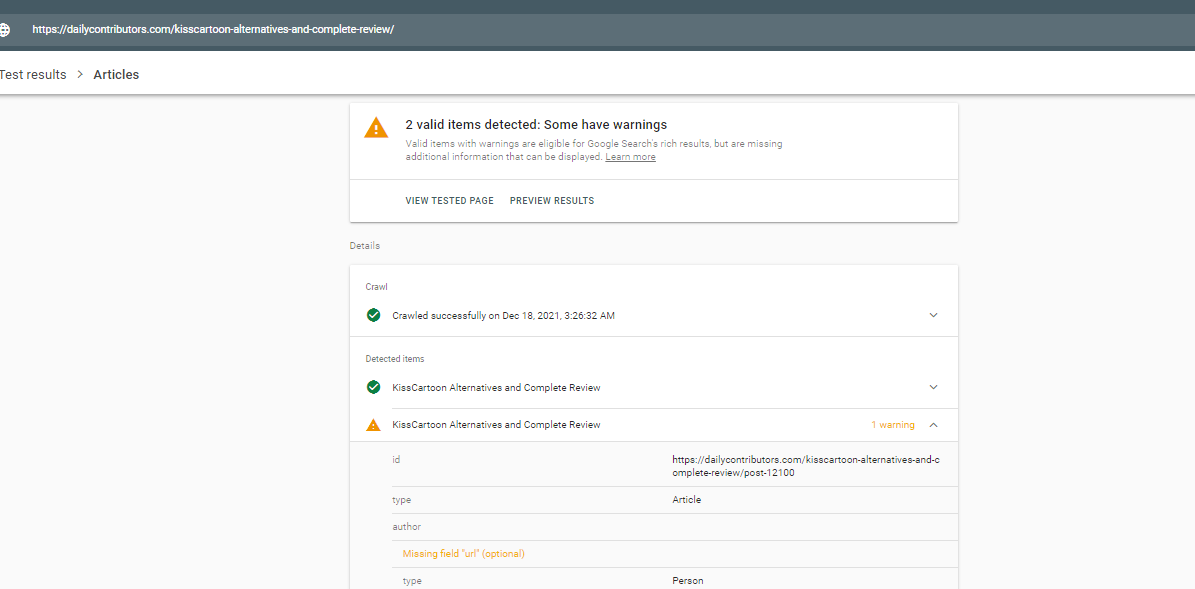
in search central results it gives me a warning "Missing field "url" (optional)".
So is this really be going to issue for my ranking ? Please help thanks!
-
@JoeySolicitor I thinks , My website sam with your issue

Got a burning SEO question?
Subscribe to Moz Pro to gain full access to Q&A, answer questions, and ask your own.
Browse Questions
Explore more categories
-
Moz Tools
Chat with the community about the Moz tools.
-
SEO Tactics
Discuss the SEO process with fellow marketers
-
Community
Discuss industry events, jobs, and news!
-
Digital Marketing
Chat about tactics outside of SEO
-
Research & Trends
Dive into research and trends in the search industry.
-
Support
Connect on product support and feature requests.
Related Questions
-
Schema Markup Validator vs. Rich Results Test
I am working on a schema markup project. When I test the schema code in the Schema Markup Validator, everything looks fine, no errors detected. However, when I test it in the Rich Results Test, a few errors come back.
Intermediate & Advanced SEO | | Collegis_Education
What is the difference between these two tests? Should I trust one over the other?1 -
Looking for live web examples of Medical schema
Has anyone seen a hospital system or medical clinic properly employ schema markup to their sites? This seems like very new territory, and we want to do it right by our client. Are there any best practices I need to look out for?
Web Design | | Madgenius3 -
Why do some URLs for a specific client have "/index.shtml"?
Reviewing our client's URLs for a 301 redirect strategy, we have noticed that many URLs have "/index.shtml." The part we don'd understand is these URLs aren't the homepage and they have multiple folders followed by "/index.shtml" Does anyone happen to know why this may be occurring? Is there any SEO value in keeping the "/index.shtml" in the URL?
Technical SEO | | FranFerrara0 -
How can I Style Long "List Posts" in Wordpress?
Hi All, I have been working on a list-post which spans over 100 items. Each item on the list has a quick blurb to explain it, an image and a few resource links. I am trying to find an attractive way to present this long list post in Wordpress. I have seen several sites with long list posts however; they place their items one on top of the other which yields a VERY long page and the end user has to do a lot of scrolling. Others turn their lists into slideshows, but I have no data on how slides perform against 10-mile-long-lists which load in 1 page. I would like to do something similar to what List25.com does as they present about 5-10 items per page and they seem to have pagination. The pagination part I understand however; is there a shortcode plugin to format lists in an attractive way just like list25?
Technical SEO | | IvanC0 -
How Does Google's "index" find the location of pages in the "page directory" to return?
This is my understanding of how Google's search works, and I am unsure about one thing in specific: Google continuously crawls websites and stores each page it finds (let's call it "page directory") Google's "page directory" is a cache so it isn't the "live" version of the page Google has separate storage called "the index" which contains all the keywords searched. These keywords in "the index" point to the pages in the "page directory" that contain the same keywords. When someone searches a keyword, that keyword is accessed in the "index" and returns all relevant pages in the "page directory" These returned pages are given ranks based on the algorithm The one part I'm unsure of is how Google's "index" knows the location of relevant pages in the "page directory". The keyword entries in the "index" point to the "page directory" somehow. I'm thinking each page has a url in the "page directory", and the entries in the "index" contain these urls. Since Google's "page directory" is a cache, would the urls be the same as the live website (and would the keywords in the "index" point to these urls)? For example if webpage is found at wwww.website.com/page1, would the "page directory" store this page under that url in Google's cache? The reason I want to discuss this is to know the effects of changing a pages url by understanding how the search process works better.
Technical SEO | | reidsteven750 -
How do I add "noindex" or "nofollow" to a link in Wordpress
It's been a while since I've SEOed a Wordpress site. How do I add "nofollow" or "noindex" to specific links? I highlight the anchor text in the text editor, I click the "link" button. I could have sworn that there used to be an option in the dialogue box that pops up.
Technical SEO | | CsmBill0 -
Old URL redirect to New URL
Alright I did something dumb a year a go and I'm still paying for it. I changed my hyphenated URL to the non-hyphenated version when I redesigned my website. I say it was dumb because I lost most of my link juice even though I did 301 redirects (via the htaccess file) for almost all of the pages I could find in Google's index. Here's my problem. My new site took a huge hit in traffic (down 60%) when I made the change and even though I've done thousands of redirects my old site is still showing up in the SERPS and send much if not most of my traffic. I don't want to take the old site down in fear it will kill all of my traffic. What should I do? Is there a better method I should explore then 301 redirects? Could the other site be affecting my current rank since it's still there? (FYI...both sites are built on the WP platform). Any help or ideas are greatly appreciated. Thank you! Joe
Technical SEO | | kaje0 -
Trailing Slashes In Url use Canonical Url or 301 Redirect?
I was thinking of using 301 redirects for trailing slahes to no trailing slashes for my urls. EG: www.url.com/page1/ 301 redirect to www.url.com/page1 Already got a redirect for non-www to www already. Just wondering in my case would it be best to continue using htacces for the trailing slash redirect or just go with Canonical URLs?
Technical SEO | | upick-1623910