Moz Q&A is closed.
After more than 13 years, and tens of thousands of questions, Moz Q&A closed on 12th December 2024. Whilst we’re not completely removing the content - many posts will still be possible to view - we have locked both new posts and new replies. More details here.
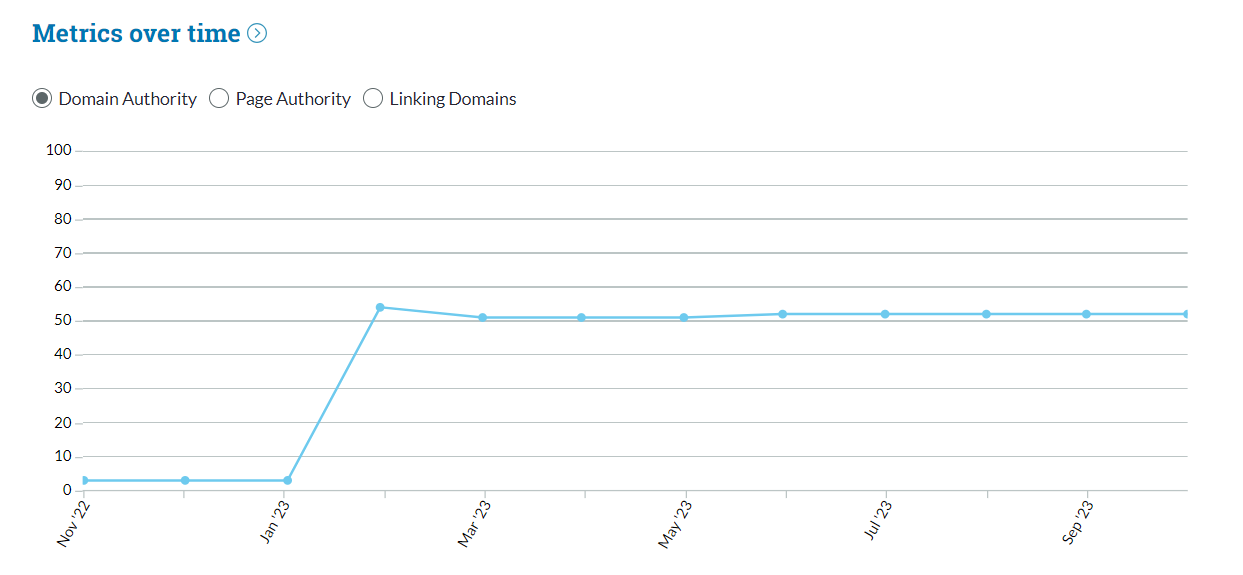
Domain Authority dropped 10 points and I don't know why
-
In my latest site crawl, the domain authority dropped 10 points for no apparent reason. There have been no changes to the site. The only change I have made this month is to block referral spam to the site. My competitors' DAs have stayed the same too.
website name: https://knowledgefront.co.uk/
Any ideas?
-
Check for incoming links and see if there's any pattern. Check referral traffic and see if any bot traffic is landing on your website or not. Try the following steps:
- Create a filter in analytics
- Block spam IPs
- Block bot traffic to land on your website.
- Create quality backlinks
- Find out pages that are performing lower in SERP i.e. 5,6,7 or 8,9th positions. Optimize them and push them for better CTR.
Once you are done, submit sitemap and wait for some time, I hope this will help you out recovering the lost DA as it works for me.
Regards,
Ravi Kumar Rana
TheSEOGuy -
@lisababblebird said in Domain Authority dropped 10 points and I don't know why:
With just a quick look, you've got 53ish links and many of them are questionable at best, or directory links.
So, link quality may be an issue, also, did you manually disavow links? If so, you probably just brought unwanted attention to your site.
We never tell clients to disavow on their own... only if they receive a manual penalty do we take that step.
Instead, focus on building actual valuable links as Google and other search engines have gotten pretty good at recognizing and ignoring spam links on their own.
Got a burning SEO question?
Subscribe to Moz Pro to gain full access to Q&A, answer questions, and ask your own.
Browse Questions
Explore more categories
-
Moz Tools
Chat with the community about the Moz tools.
-
SEO Tactics
Discuss the SEO process with fellow marketers
-
Community
Discuss industry events, jobs, and news!
-
Digital Marketing
Chat about tactics outside of SEO
-
Research & Trends
Dive into research and trends in the search industry.
-
Support
Connect on product support and feature requests.
Related Questions
-
Should I split long form content?
I have quite a long content on my site. By length I mean around 8000-9000 words. I optimized it to cover almost all searches related to a topic. But this length makes me uneasy for some reason. I do not think that users will find what they are looking for in such a long content. However, I don't want to neglect the SEO aspect of the content. I can talk about something like this without sharing the keywords completely: Title + for girls Title + for boys Title + for kids Title + for girlfriend Title + for boyfriend Title + for students As I said, in the current situation, these are all sub-headings (H2) of 8000-9000-word content. When I make a separate content for each of them, I can bring them all closer to 1500-2000 words. However, I am undecided whether this is the right step in terms of SEO and content optimization. What are your views?
SEO Tactics | | mozasea0 -
Old domain to new domain
Hi, A website on server A is no longer required. The owner has redirected some URLS of this website (via plugin) to his new website on server B -but not all URLS. So when I use COMMAND site:website A , I see a mixture of redirected URLS and not redirected URLS.Therefore two websites are still being indexed in some form and causing duplication. However, weirdly when I crawl with Screaming Frog I only see one URL which is 301 redirected to the new website. I would have thought I'd see lots of URLs which hadn't been redirected. How come it is different to using the site:command? Anyway, how do I move to the new website completely without the old one being indexed anymore. I thought I knew this but have read so many blogs I've confused myself! Should I: Redirect all URLS via the HTACESS file on old website on server A? There are lots of pages indexed so a lot of URLs. What if I miss some? or Point the old domain via DNS to server B and do the redirects in website B HTaccess file? This seems more sensible but does this method still retain the website rankings? Thanks for any help
Technical SEO | | AL123al0 -
Should I disavow links from pages that don't exist any more
Hi. Im doing a backlinks audit to two sites, one with 48k and the other with 2M backlinks. Both are very old sites and both have tons of backlinks from old pages and websites that don't exist any more, but these backlinks still exist in the Majestic Historic index. I cleaned up the obvious useless links and passed the rest through Screaming Frog to check if those old pages/sites even exist. There are tons of link sending pages that return a 0, 301, 302, 307, 404 etc errors. Should I consider all of these pages as being bad backlinks and add them to the disavow file? Just a clarification, Im not talking about l301-ing a backlink to a new target page. Im talking about the origin page generating an error at ping eg: originpage.com/page-gone sends me a link to mysite.com/product1. Screamingfrog pings originpage.com/page-gone, and returns a Status error. Do I add the originpage.com/page-gone in the disavow file or not? Hope Im making sense 🙂
Technical SEO | | IgorMateski0 -
404 error - but I can't find any broken links on the referrer pages
Hi, My crawl has diagnosed a client's site with eight 404 errors. In my CSV download of the crawl, I have checked the source code of the 'referrer' pages, but can't find where the link to the 404 error page is. Could there be another reason for getting 404 errors? Thanks for your help. Katharine.
Technical SEO | | PooleyK0