Moz Q&A is closed.
After more than 13 years, and tens of thousands of questions, Moz Q&A closed on 12th December 2024. Whilst we’re not completely removing the content - many posts will still be possible to view - we have locked both new posts and new replies. More details here.
How to index e-commerce marketplace product pages
-
Hello!
We are an online marketplace that submitted our sitemap through Google Search Console 2 weeks ago. Although the sitemap has been submitted successfully, out of ~10000 links (we have ~10000 product pages), we only have 25 that have been indexed.
I've attached images of the reasons given for not indexing the platform.
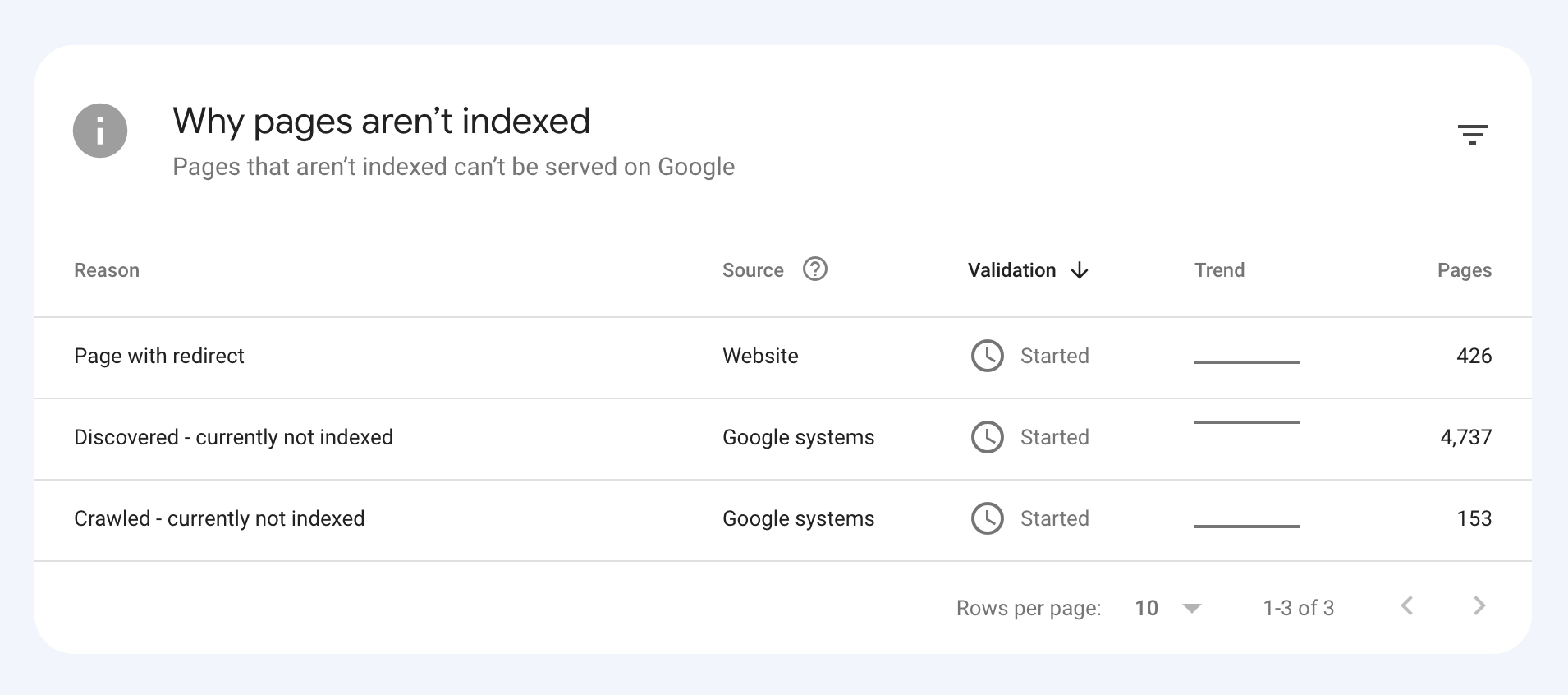
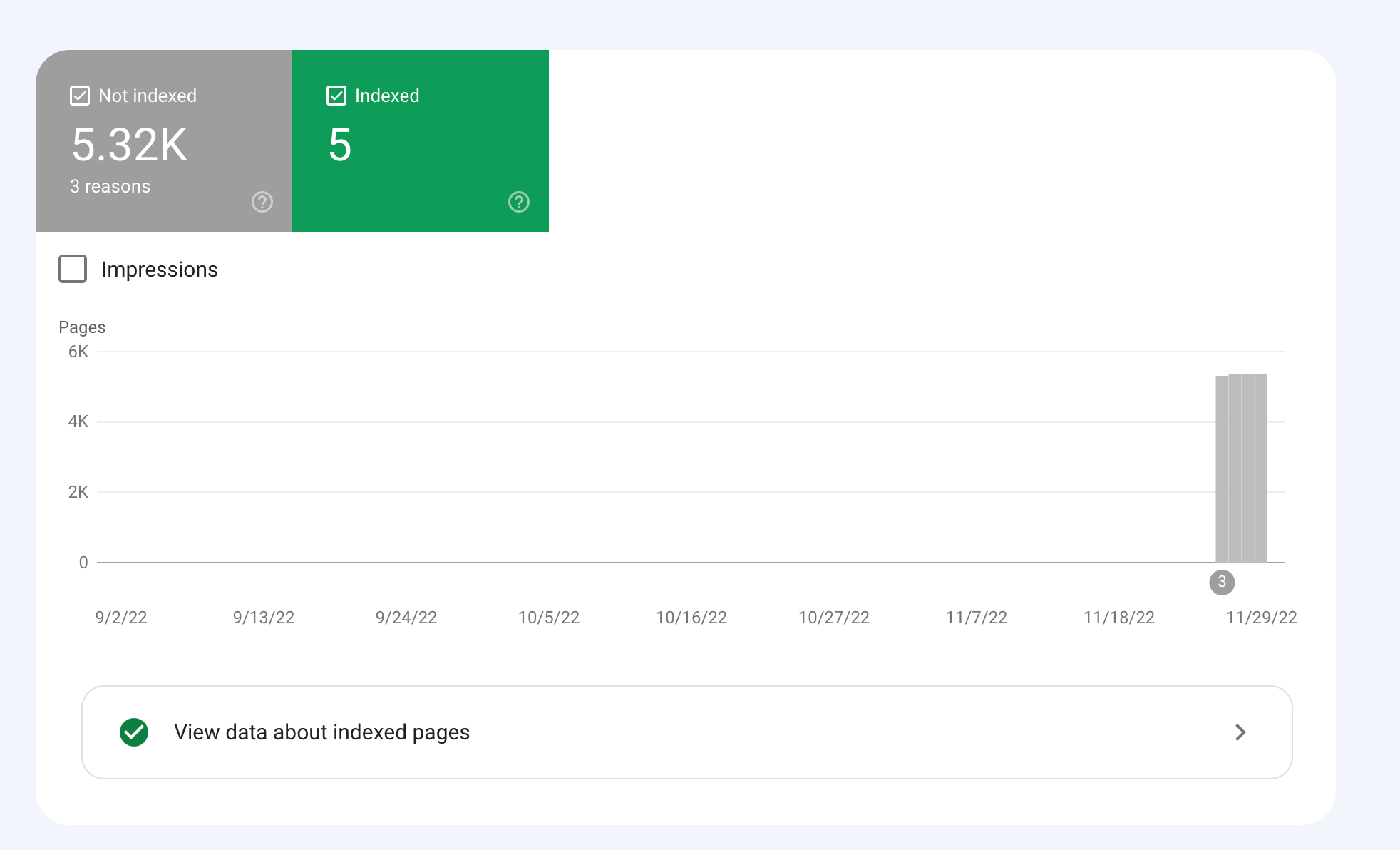
How would we go about fixing this?
-
To get your e-commerce marketplace product pages indexed, make sure your pages include unique and descriptive titles, meta descriptions, relevant keywords, and high-quality images. Additionally, optimize your URLs, leverage schema markup, and prioritize user experience for increased search engine visibility.
-
@fbcosta i hve this problem but its so less in my site
پوشاک پاپیون -
I'd appreciate if someone who faced the same indexing issue comes forward and share the case study with fellow members. Pin points steps a sufferer should do to overcome indexing dilemma. What actionable steps to do to enable quick product indexing? How we can get Google's attention so it can start indexing pages at a quick pace? Actionable advice please.
-
There could be several reasons why only 25 out of approximately 10,000 links have been indexed by Google, despite successfully submitting your sitemap through Google Search Console:
Timing: It is not uncommon for indexing to take some time, especially for larger sites with many pages. Although your sitemap has been submitted, it may take several days or even weeks for Google to crawl and index all of your pages. It's worth noting that not all pages on a site may be considered important or relevant enough to be indexed by Google.
Quality of Content: Google may not index pages that it considers low-quality, thin or duplicate content. If a significant number of your product pages have similar or duplicate content, they may not be indexed. To avoid this issue, make sure your product pages have unique, high-quality content that provides value to users.
Technical issues: Your site may have technical issues that are preventing Google from crawling and indexing your pages. These issues could include problems with your site's architecture, duplicate content, or other issues that may impact crawling and indexing.
Inaccurate Sitemap: There is also a possibility that there are errors in the sitemap you submitted to Google. Check the sitemap to ensure that all the URLs are valid, the sitemap is up to date and correctly formatted.
To troubleshoot this issue, you can check your site's coverage report on Google Search Console, which will show you which pages have been indexed and which ones haven't. You can also check your site's crawl report to see if there are any technical issues that may be preventing Google from crawling your pages. Finally, you can also run a site audit to identify and fix any technical issues that may be impacting indexing.
-
@fbcosta As per my experience, if your site is new it will take some time to index all of the URLs, and the second thing is, if you have Hundreds of URLs, it doesn't mean Google will index all of them.
You can try these steps which will help in fast indexing:
- Sharing on Social Media
- Interlinking from already indexed Pages
- Sitemap
- Share the link on the verified Google My Business Profile (Best way to index fast). You can add by-products or create a post and link it to the website.
- Guest post
I am writing here for the first time, I hope it will help

Got a burning SEO question?
Subscribe to Moz Pro to gain full access to Q&A, answer questions, and ask your own.
Browse Questions
Explore more categories
-
Moz Tools
Chat with the community about the Moz tools.
-
SEO Tactics
Discuss the SEO process with fellow marketers
-
Community
Discuss industry events, jobs, and news!
-
Digital Marketing
Chat about tactics outside of SEO
-
Research & Trends
Dive into research and trends in the search industry.
-
Support
Connect on product support and feature requests.
Related Questions
-
How to Boost Your WordPress Website Speed to 95+ (Without Premium Plugins)
I'm reaching out for some advice on improving my WordPress website's speed. I'm currently using a free theme for this fusion magazine and aiming for a score of 95+ on Google PageSpeed Insights. I'm aware that premium plugins can significantly enhance performance, but I'm hoping to achieve similar results using primarily free solutions and manual optimizations.
Technical SEO | | mohammadrehanseo0 -
Good to use disallow or noindex for these?
Hello everyone, I am reaching out to seek your expert advice on a few technical SEO aspects related to my website. I highly value your expertise in this field and would greatly appreciate your insights.
Technical SEO | | williamhuynh
Below are the specific areas I would like to discuss: a. Double and Triple filter pages: I have identified certain URLs on my website that have a canonical tag pointing to the main /quick-ship page. These URLs are as follows: https://www.interiorsecrets.com.au/collections/lounge-chairs/quick-ship+black
https://www.interiorsecrets.com.au/collections/lounge-chairs/quick-ship+black+fabric Considering the need to optimize my crawl budget, I would like to seek your advice on whether it would be advisable to disallow or noindex these pages. My understanding is that by disallowing or noindexing these URLs, search engines can avoid wasting resources on crawling and indexing duplicate or filtered content. I would greatly appreciate your guidance on this matter. b. Page URLs with parameters: I have noticed that some of my page URLs include parameters such as ?variant and ?limit. Although these URLs already have canonical tags in place, I would like to understand whether it is still recommended to disallow or noindex them to further conserve crawl budget. My understanding is that by doing so, search engines can prevent the unnecessary expenditure of resources on indexing redundant variations of the same content. I would be grateful for your expert opinion on this matter. Additionally, I would be delighted if you could provide any suggestions regarding internal linking strategies tailored to my website's structure and content. Any insights or recommendations you can offer would be highly valuable to me. Thank you in advance for your time and expertise in addressing these concerns. I genuinely appreciate your assistance. If you require any further information or clarification, please let me know. I look forward to hearing from you. Cheers!0 -
Unsolved Question about a Screaming Frog crawling issue
Hello, I have a very peculiar question about an issue I'm having when working on a website. It's a WordPress site and I'm using a generic plug in for title and meta updates. When I go to crawl the site through screaming frog, however, there seems to be a hard coded title tag that I can't find anywhere and the plug in updates don't get crawled. If anyone has any suggestions, thatd be great. Thanks!
Technical SEO | | KyleSennikoff0 -
Reviews on Product Page or Separated
Good Afternoon We currently have our individual product information pages set-up with a link through to a separate review page optimised for the term "Product A Reviews" I was reading about structured data and if I read correctly, the reviews should sit with the marked up product data so I was wondering whether to merge them back into one page. We have many reviews so the review pages are paginated in blocks of 25 My options are: Leave as it is, product info page and separate review page Merge the review content back in to the main page and have the pagination work on that page Include the first 25 reviews on the product info page then when user clicks through to page 2, 3 etc they're taken to the separated review page. In that way the product page would regularly get new content and we can still have a page specifically targeted for reviews. From the users point of view, they probably aren't even aware they're being taken to a separate reviews page so with that in mind as I'm typing this maybe they should be one page again
Technical SEO | | Ham19790 -
Canonical tag use for ecommerce product page detail
Hi, I have a category page I want to rank. This page has 24 different products quite similar but not exactly the same.
Technical SEO | | amastone
I want to use canonical tag in any product to the parent category.
Is this a right use of the canonical?
Category page I'm talking about is : Finger bits If I understand how to use canonical tags I can improve all my category pages. thanks marco0 -
Are subdomains a good seo strategy for a multistore e-commerce?
Hi there I'm wondering what is the best strategy to work with multi-stores on magento: to use or not to use subdomains? Suppose we have the www.website.com and we configure it to use multistore. The url base will not have the store id on it so it will not be like www.website.com/store1 and www.website.com/store2. It will simply rely on the user session so if we have two categories for each store it will acces using: www.website.com/category1 (for store 1) www.website.com/category2 (for store 2) The homepage will allways be set on www.website.com so we should have a single page for several "home pages" (depending on the user session / store he is accessing). I guess this is not a good option if we want to rank for different keywords (for each store). So I was wondering if it is a good solution to set: store1.website.com store2.website.com This way we have 2 "home pages" each one able to rank. Does it make sense? Is it good or bad for seo? Another option I was considering was: www.website.com (for store 1) store2.website.com (for store 2) store3.website.com (for store 3) www.website.com/blog (for blog) Can this work? Good or bad for seo? best regards
Technical SEO | | qgairsoft0 -
How to change the woocommerce product page permalink
Sorry Posting it again. How I can change the product URL structure. Please let me know how to fix woocommerce permalink in wordpress. My current URL is http://www.ayurjeewan.com/product/divya-ashmarihar-kwath and I want to like (only post name) http://www.ayurjeewan.com/divya-ashmarihar-kwath Attached is the screenshot of option available. qa2hZMP.jpg
Technical SEO | | JordanBrown0 -
Handling 301s: Multiple pages to a single page (consolidation)
Been scouring the interwebs and haven't found much information on redirecting two serparate pages to a single new page. Here is what it boils down to: Let's say a website has two pages, both with good page authority of products that are becoming fazed out. The products, Widget A and Widget B, are still popular search terms, but they are being combined into ONE product, Widget C. While Widget A and Widget B STILL have plenty to do with Widget C, Widget C is now the new page, the main focus page, and the page you want everyone to see and Google to recognize. Now, do I 301 Widget A and Widget B pages to Widget C, ALTHOUGH Widgets A and B previously had nothing to do with one another? (Remember, we want to try and keep some of that authority the two page have had.) OR do we keep Widget A and Widget B pages "alive", take them off the main navigation, and then put a "disclaimer" on the pages announcing they are now part of Widget C and link to Widget C? OR Should Widgets A and B page be canonicalized to Widget C? Again, keep in mind, widgets A and B previously were not similar, but NOW they are and result in Widget C. (If you are confused, we can provide a REAL work example of what we are talkinga about, but decided to not be specific to our industry for this.) Appreciate any and all thoughts on this.
Technical SEO | | JU19850