Moz Q&A is closed.
After more than 13 years, and tens of thousands of questions, Moz Q&A closed on 12th December 2024. Whilst we’re not completely removing the content - many posts will still be possible to view - we have locked both new posts and new replies. More details here.
Bing Places for Business - Worth It?
-
Hey Fellow Mozzers,
I am trying to determine if Bing Places for Business is worth the time and effort it takes to create listings. My business has 900 locations, and would take some time to create the bulk upload file to load into the Bing Places for Business dashboard.
My question is, since Bing already does a good job of creating business listings using data from 3rd party sources such as Yelp and Citysearch, where I already have a strong presence for each of my locations, is there any value in overriding the automatically created business page for each of my location with information that I upload?
-
Up to 10,000 bulk easy upload is available as well!
https://www.bingplaces.com/Home/MoreFAQ
Hope this helps
-
Brad, ultimately you have to weigh the time involved in creating the spreadsheet(s) required, gathering the data, and then uploading, with the benefits. If the current data is correct, then it wouldn't hurt if you didn't take the time to upload the data.
However, keep in mind that if you're going to upload the data, then that will help with verification. So, since you've taken ownership of those listings, there's a better chance that you may rank better and show up more often in the search results because those are verified listings. This goes for Bing as well as Google.
So, yes, I do believe it is "worth it" to take the time to verify the listings and upload the data (and take ownership of those listings).



Got a burning SEO question?
Subscribe to Moz Pro to gain full access to Q&A, answer questions, and ask your own.
Browse Questions
Explore more categories
-
Moz Tools
Chat with the community about the Moz tools.
-
SEO Tactics
Discuss the SEO process with fellow marketers
-
Community
Discuss industry events, jobs, and news!
-
Digital Marketing
Chat about tactics outside of SEO
-
Research & Trends
Dive into research and trends in the search industry.
-
Support
Connect on product support and feature requests.
Related Questions
-

How to remove a link in GMB "Products & Services: places.SinglePlatform.com"
I manage a GMB account for an HVAC client and noticed in their knowledge graph it shows: "Products & Services: places.SinglePlatform.com" I cannot find this anywhere on the backend on GMB. Has anyone experienced this and how did you fix/remove the link? Luckily, the link goes to the clients profile on SinglePlatform, but the info is outdated.
Local Listings | | Bryan_Loconto0 -

Yahoo Local Business Listings Hijacked
We are a solar company with three locations. When claiming our business listings on Yahoo (Yext), we noticed that one of them had already been claimed. The name of our company and our phone number were changed to a lead generation company. Upon further inspection, this company has hijacked hundreds of listings throughout the state and the country. To see the extent of it, go here:
Local Listings | | SS.Digital
https://search.yahoo.com/local/s;_ylt=A0SO8odHUOZZdVUAYwBXNyoA;_ylu=X3oDMTByNWU4cGh1BGNvbG8DZ3ExBHBvcwMxBHZ0aWQDBHNlYwNzYw--;_ylc=X1MDMTM1MTE5NTExOARfcgMyBGdwcmlkA3loNXdiQlJqVE9HMm9MdXlUSklLdEEEbl9zdWdnAzEEb3JpZ2luA3NlYXJjaC55YWhvby5jb20EcG9zAzAEcHFzdHIDBHBxc3RybAMEcXN0cmwDMjIEcXVlcnkDc29sYXIgY29ubmVjdG9yIGlydmluZQR0X3N0bXADMTUwODI4MTk4MA--?fr2=sb-top-search&p=solar+connector+irvine&fr=yfp-t- Or, just search in Yahoo's Local search section for "Solar Connector Irvine" or pretty much any city in California. On every hijacked listing, the company name is changed to "Solar Connector" and the phone number is changed to a unique local number, but all the other information is left the same. Now when people think they are calling our business, they get a shady lead gen company instead. I have submitted a request to Yext and have tried (and failed) to find a support phone number. This is a widespread, blatant fraud, and I would hope they would have interest in fixing it. Solar Connector (fake name) is associated with SolarAmerica.com, which is run by Clean Energy Experts, which was purchased by Sunrun (a publicly traded company). My specific question is, does anyone have any insight on the best method for getting help from Yahoo/Yext? Other than through their "help portal" on the website. I need to speak with a human being.1 -

Improve Google Business ranking
While my client's websites have been ranking well in SERP for their keyterms I'm at a lost on what I can do to improve their Google business/map presence. I'm referring to their listing where the top three come up or when you search on Google Maps.
Local Listings | | FPK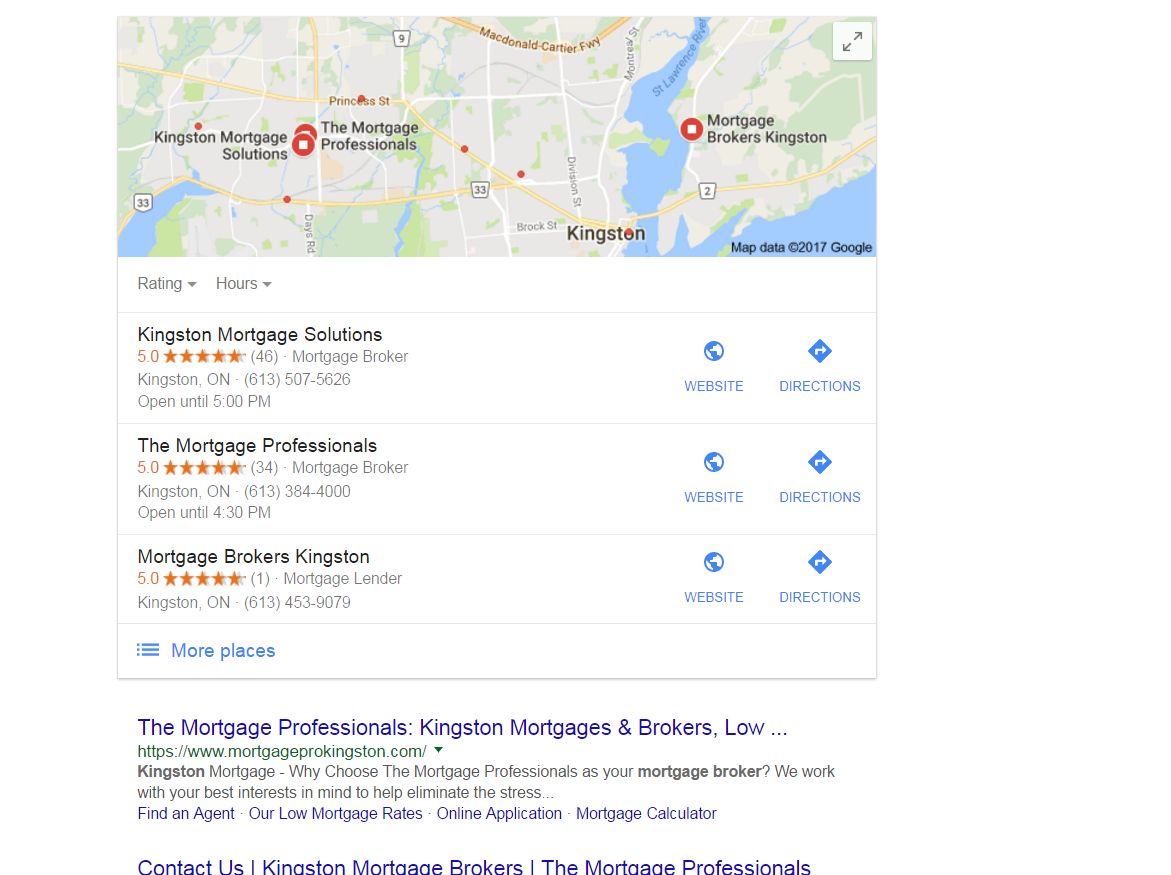
https://gyazo.com/26ec78ed7f712157ec72492199545431 Ex 1. Several months ago my client was ranked #1 both for SERP and maps until they dropped to 2nd on maps. Now they're ranked 1st in search yet 2nd for local business rankings as you can see from the screenshot above. At one point my client's business did have more reviews than the 1st ranking business yet they still weren't 1st. Ex. 2. Client(s) is ranked 4th in search and doesn't show in the top 3 map listings for their search term. If you click on More places to view Google Maps they're listed all the way down as the 15th listing or worse can't even be found when searching by their main SEO key term . Of course they are found by searching for their business name so it's not like there is a problem with the listing. I make sure to: Completely fill out their Google Business profile(NAP, hours and add pictures) Have my client try to gain positive reviews Manage and respond to reviews(mainly the negative ones) Add map and Google business link to their website Can anyone offer any other insight on what else can be done to improve their local presence on maps that I might be missing?0 -

How Do I Remove Address from Google Business Page?
Not very up to date in handling local listings, so here's my situation. I have an office that is not going out of business, but instead going virtual. So that physical address will no longer exist but the team is intact. So I am dealing with the Google Business Listing page for this office at https://business.google.com/ In the "Published on" section, it has Google Search, Google Maps, and Google+. I want to remove it from Maps and the address from this account. There's an address for this store, but editing it only seems to allow changing, but not removal. There is also the option of "Mark as Permanently Closed", but surely that isn't the best option since that will leave a nasty red "PERMANENTLY CLOSED" in the results when searching. What's the best course of action here?
Local Listings | | nbyloff0 -

For Google's Structured Data, should I change my listings from Product schema to Local Business schema?
I was reading Google's Structured Data spec, and I'm considering changing the schema of our listing pages from the Product schema to the Local Business schema. Is this a good idea? To give you a little more info, the pages that I'm classifying are listings for physical spaces that our website rents out for activities, such as meetings. Here's an example of a listing: https://www.peerspace.com/pages/listings/550ddcde2f352d0800fc186b Our goal is to add the proper schema.org tags to the page so that our spaces show up in local searches, such as "meeting space in San Francisco." The problem is that when we add location microdata (addressLocality, addressRegion, etc.) to our current "Product" schema, Google tells us that "Products" can't have a location. However, we aren't quite a "Local Business" either, since we don't publicly share our space's street addresses—only the space's neighborhood/city/state for privacy reasons. As a result, we get an error from Google's Structured Data Tool as a "Local Business" page because "streetAddress" is required for Local Businesses. Should we switch to the Local Business schema anyway, even though we get structured data errors for streetAddress? Or is it better not to include the location information in the microdata so that we don't have errors? Does Google penalize you for incomplete tags? Any input is appreciated!
Local Listings | | stuartstein0 -

SEO - Should individual doctors at facility claim a Google My Business profile?
My client is a physician facility with several doctors practicing at the facility. When doing a Google search for some of their practices such as "family practice" one of the doctor's profiles will display in the Google Local pack - however it is not linked to the facility website where their profile exists. As of right now, we are using YEXT and other tools to claim Google Business Profiles for each practice, not the individual doctors. If there are unclaimed accounts for individual doctors, they are alerting Google that it’s a duplicate and should be taken down. Is this the right process to follow for SEO best practices or should we be claiming both the business and individual doctor profiles? The reason they are not claiming individual doctor profiles is to cut down on duplicate reviews as part of the Reputation Management Program. Advice much appreciated!
Local Listings | | chrisvogel0 -

Local SEO business name issue due to aggregator
So I work for a college and we have multiple locations. My tactic has been always to keep the name the same for all of them (no city name), and then change the address and phone number for each. But there is 1000s of college listings websites out there that aggregate college and school data from the same source: the US government. Now the way that they have most, if not all, multi-location colleges listed is: "college name-city name". I can see the value in that, but I guess I'm just wondering what to do since it obviously can't be changed. Should I revert all of our listings as "college name-city name" to match the 1000s of listings that have it that way? I've been under the impression that I should leave the city/town name out of the name, but I'm just wondering what you think best practices would be? Thanks
Local Listings | | TomBinga1125
Tom0 -
How to remove a former business location from Google Places?
I've received a strange response from Google Places on local listings for a home builder. Google's rep suggested that we not list the new home sales center (a model home) since at some point it will change from being a business listing to a residential listing. That is just wrong. It will be a place of business for the next 3 years and then will flip to being a private residence. These days it is uncommon, but not that rare to turn over ownership from public to private or vice versa (A residence becoming a law or other commercial establishment. Or a whole office building becoming condos.) The issue is, when it does happen, how do we get Google and others to recognize that a business is no longer a business location? I've had trouble bringing down the address of former former model home sales centers on Google Places much to the chagrin of the residents.
Local Listings | | BlairKuhnen0
