Moz Q&A is closed.
After more than 13 years, and tens of thousands of questions, Moz Q&A closed on 12th December 2024. Whilst we’re not completely removing the content - many posts will still be possible to view - we have locked both new posts and new replies. More details here.
Should I "no-index" two exact pages on Google results?
-
Hello everyone,
I recently started a new wordpress website and created a static homepage.
I noticed that on Google search results, there are two different URLs landing on same content page.
I've attached an image to explain what I saw.
Should I "no-index" the page url?
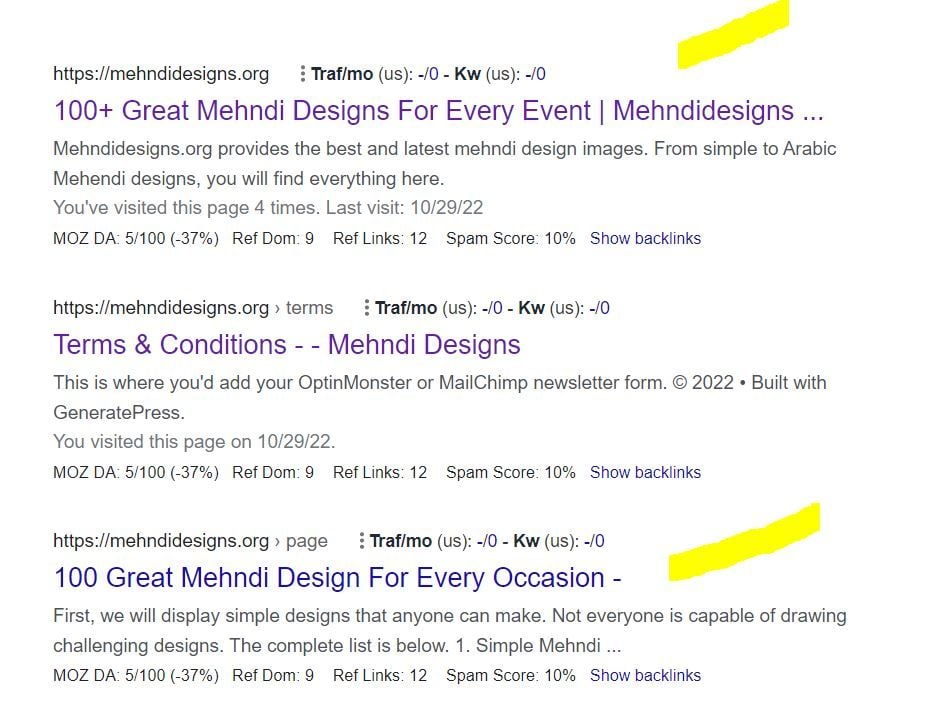
In this picture, the first result is the homepage and I try to rank for that page. The last result is landing on same content with different URL.
So, should I no-index last result as shown in image?
-
In any SEO plugin, you can go to edit the secondary article and in canonical URL you put the link to the home page.
-
@amanda5964 You can use canonical meta tag to tell google that those are the exact same pages. Google will index one of them which google choose best for the SERP.
-
Hi @amanda5964 actually could I ask if there is a reason for having these identical pages? You might want to consider simply combining the pages - i.e. deleting your sub page and redirecting to home if the content is identical.
-
I would not no-index. Typically it is more effective to use a canonical link from the secondary content to the main page you want the traffic directed to.
Got a burning SEO question?
Subscribe to Moz Pro to gain full access to Q&A, answer questions, and ask your own.
Browse Questions
Explore more categories
-
Moz Tools
Chat with the community about the Moz tools.
-
SEO Tactics
Discuss the SEO process with fellow marketers
-
Community
Discuss industry events, jobs, and news!
-
Digital Marketing
Chat about tactics outside of SEO
-
Research & Trends
Dive into research and trends in the search industry.
-
Support
Connect on product support and feature requests.
Related Questions
-
Who is the best SEO expert in the World?
Hey everyone, i am creating a blog post on Top SEO Experts in the World. I need your recommendation who is in the top 10 list? Your suggestions is highly appreciated for me. Thanks!
International SEO | | gxpl090 -
Staging website got indexed by google
Our staging website got indexed by google and now MOZ is showing all inbound links from staging site, how should i remove those links and make it no index. Note- we already added Meta NOINDEX in head tag
Intermediate & Advanced SEO | | Asmi-Ta0 -
Ranking going south
Hi - I have a site Simply Stairlifts and I don't understand it but I've followed all the SEO processes of cleaning the site and building links, but ranking just keeps falling - any advise would be very gratefully received 👍 .
SEO Tactics | | Naju2310 -
Shopify SEO - Double Filter Pages
Hi Experts, Single filter page: /collections/dining-chairs/black
Technical SEO | | williamhuynh
-- currently, canonical the same: /collections/dining-chairs/black
-- currently, index, follow Double filter page: /collections/dining-chairs/black+fabric
-- currently, canonical the same: /collections/dining-chairs/black+fabric
-- currently, noindex, follow My question is about double filter page above:
if noindexing is the better option OR should I change the canonical to /collections/dining-chairs/black Thank you0 -
To hyphenate or not to hyphenate?
Quick question: does Google differentiate between terms that correctly include a hyphen (such as "royalty-free") and those that are incorrect ("royalty free")? I ask because the correct term "royalty-free"(with a hyphen) receives far less monthly traffic for the same term without the hyphen (according to Moz): Term | Estimated traffic
On-Page Optimization | | JCN-SBWD
"royalty free music" | 11.5-30.3K
"royalty-free music" | 501-850 If Moz views the terms separately then I'd guess that Google does too, in which case the best thing to do for SEO (and increased site traffic) would be to wrongly use "royalty free" without the hyphen. Is that correct?0 -
Does Google index internal anchors as separate pages?
Hi, Back in September, I added a function that sets an anchor on each subheading (h[2-6]) and creates a Table of content that links to each of those anchors. These anchors did show up in the SERPs as JumpTo Links. Fine. Back then I also changed the canonicals to a slightly different structur and meanwhile there was some massive increase in the number of indexed pages - WAY over the top - which has since been fixed by removing (410) a complete section of the site. However ... there are still ~34.000 pages indexed to what really are more like 4.000 plus (all properly canonicalised). Naturally I am wondering, what google thinks it is indexing. The number is just way of and quite inexplainable. So I was wondering: Does Google save JumpTo links as unique pages? Also, does anybody know any method of actually getting all the pages in the google index? (Not actually existing sites via Screaming Frog etc, but actual pages in the index - all methods I found sadly do not work.) Finally: Does somebody have any other explanation for the incongruency in indexed vs. actual pages? Thanks for your replies! Nico
Technical SEO | | netzkern_AG0 -
How to stop google from indexing specific sections of a page?
I'm currently trying to find a way to stop googlebot from indexing specific areas of a page, long ago Yahoo search created this tag class=”robots-nocontent” and I'm trying to see if there is a similar manner for google or if they have adopted the same tag? Any help would be much appreciated.
Technical SEO | | Iamfaramon0 -
Can you noindex a page, but still index an image on that page?
If a blog is centered around visual images, and we have specific pages with high quality content that we plan to index and drive our traffic, but we have many pages with our images...what is the best way to go about getting these images indexed? We want to noindex all the pages with just images because they are thin content... Can you noindex,follow a page, but still index the images on that page? Please explain how to go about this concept.....
Technical SEO | | WebServiceConsulting.com0